Changes
v0.2.0
Use settings to setup connection parameters
The SecsHandler and GemHandler classes were initialized using the hsms configuration as parameters.
import secsgem

secsgem.GemHandler("10.211.55.33", 5000, False, 0, "test")
As new a new protocol and a new connection layer was added, this initialisation doesn’t fit all instances any more. For this reason new Settings classes were introduced:
import secsgem.common

import secsgem.hsms
import secsgem.secsi
import secsgem.secsitcp

hsms_settings = secsgem.hsms.HsmsSettings(
    device_type=secsgem.common.DeviceType.EQUIPMENT,
    connect_mode=secsgem.hsms.HsmsConnectMode.ACTIVE,
    address="127.0.0.1",
    port=5001,
)

secsi_settings = secsgem.secsi.SecsISettings(
    device_type=secsgem.common.DeviceType.HOST,
    port="COM1",
    speed=9600,
)

secsi_tcp_settings = secsgem.secsitcp.SecsITcpSettings(
    device_type=secsgem.common.DeviceType.EQUIPMENT,
    connect_mode=secsgem.secsitcp.SecsITcpConnectMode.CLIENT,
    address="127.0.0.1",
    port=5555,
)

# initialize handler with settings
import secsgem.gem

handler = secsgem.gem.GemEquipmentHandler(secsi_settings)
Add SECS-I and SECS-I over TCP support
The SECS-II and GEM handlers were built upon and inheriting the HSMS handler, making the communication and protocol mingled with the higher level message handling. This required separation of the communication and protocol from the message handling.
Communication layer
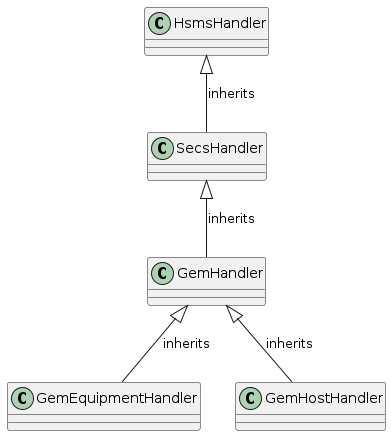
Old structure
The old class structure was quite linear, inheriting functionality from the basic class.
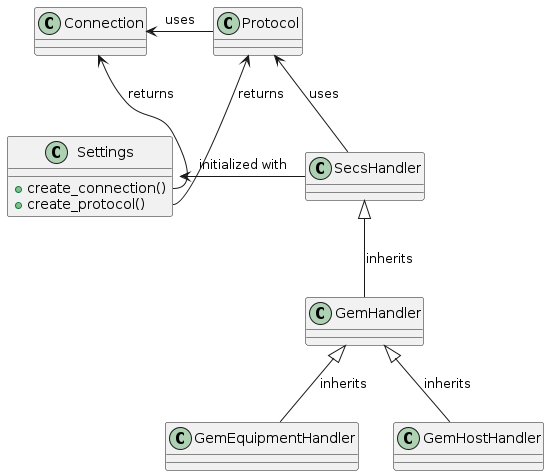
New Structure
Now the handlers are initialized with a Settings object, which in turn creates the Protocol and Communication classes used by the handler.
This way the communication layer can be switched by simply passing different settings.
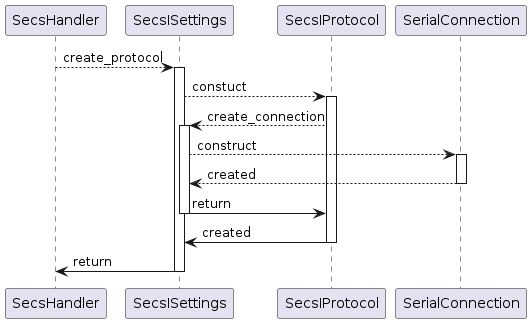
Initialisation
Packets
The incoming data was encapsulated in a HsmsPacket object.
But this was protocol specific.
Now every protocol type has an own message type, inherited from a base Message class.
This base class defines the interface for the Messages.
It uses a protocol specific header object inherited from Header and is made up of blocks using the Block class.
Renamed events
Due to the new communication layer (serial) and protocol (SECS-I) some events are renamed to match the use case:
old |
new |
|---|---|
hsms_connected |
connected |
hsms_selected |
communicating |
hsms_disconnected |
disconnected |
packet_received |
message_received |
Serialized message callback
Each message callback was called from a new thread to allow the receiver thread to be responsive for new packets. This could lead to messages not arriving in an expected order.
Now incoming packets are added to a queue, which is processed by a single, separate thread. This allows the receiver thread to be responsive and the callbacks to be called in the order the packets are received.
Split big secsgem namespace and rename classes
All the classes were available in the toplevel secsgem namespace (e.g. secsgem.CallbackHandler).
This global namespace made the classes easy to access, but it was pretty big and the classes had names that were redundant with the individual namespaces.
In this version the classes need to be imported and accessed using the sub-namespace.
Old:
import secgem
from secsgem import SecsHandler

secsgem.GemEquipmentHandler(...)
SecsHandler(...)
New:
import secgem.gem
from secsgem.secs import SecsHandler

secsgem.gem.GemEquipmentHandler(...)
SecsHandler(...)
Data item and stream/function classes are now auto-generated
As these classes are quite similar in code, the differences are extracted and included in yaml files in the data directory. (data/data_items.yaml and data/functions.yaml)
The contents of the files in the directories secsgem/secs/data_items and secsgem/secs/functions are generated from these yaml files using templates.
Also the class API documentation file is generated using the yaml files.
All generator data is located in the data directory in the project root, including the generator script (data/generate_data.py) and the template files (data/*.j2)